


WooCommerce development services in 2026 are less about “building a perfect WooCommerce store” and more about operating a revenue system: building, extending, monitoring, and improving a WooCommerce website without turning it into a brittle plugin tower.
Ultimately, the best WooCommerce service isn’t a one-time project, but it’s a partnership with WooCommerce specialists who keep your business secure and always converting. Whether you hire a WooCommerce-certified developer or engage a WooCommerce consultant for complex customizations, the goal remains the same: sustainable growth with increased revenue.
And here’s the honest version: if you’re allergic to updates, don’t want to manage hosting, and you just want to sell 10 products with minimal customization, WooCommerce can be overkill. But if you’re scaling, that’s exactly when you need WooCommerce website development services from a reliable WooCommerce agency or WooCommerce development company to keep your WooCommerce website running smoothly.
Table of Contents:
- Future-Proof Your E-commerce with WooCommerce Development Services
- Core Features of WooCommerce Development Services
- Expert Developer Access
- Strengths and Limitations
- Usability Insights
- Onboarding Experience
- Interface Quality
- Learning Curve
- Mini example: the “coupon chaos” problem
- Performance Evaluation
- Speed and Uptime
- How I’d evaluate performance (before and after)
- Common performance mistakes (the ones I keep seeing)
- Real-ish example: the “one script killed mobile” incident
- Pricing Structure
- What you’re actually paying for
- Common pricing trap
- Limitations of WooCommerce Website Development Services
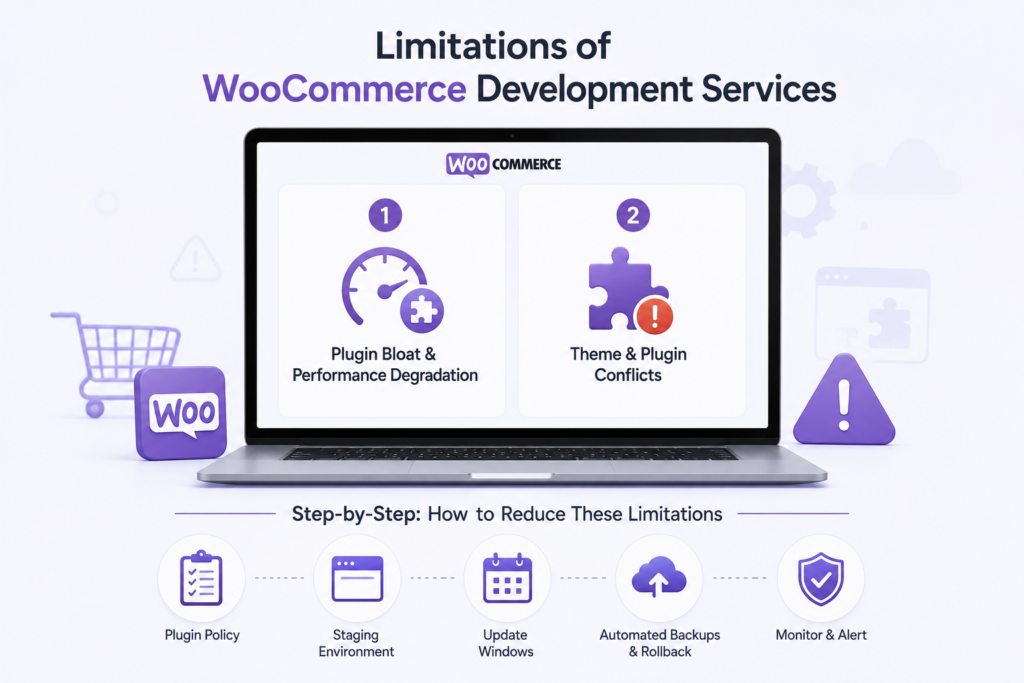
- Plugin bloat and performance degradation
- Theme and plugin conflicts
- Step-by-step: how to reduce these limitations
- Alternatives to Consider
- Frequently Asked Questions
Core Features of WooCommerce Development Services
WooCommerce website development can look wildly different from one provider to another. Some are basically “WordPress agencies that also do WooCommerce.” Others are true WooCommerce specialists who understand what features matter in 2026.
Diverse Service Offerings (and what I’d actually pay for)
Most WooCommerce providers list the same menu: themes, plugins, integrations, and maintenance, but the difference is how they execute, and that’s where true WooCommerce experts and WooCommerce specialists separate themselves from generic agencies. The right WooCommerce agency doesn’t just check boxes; they deliver custom WooCommerce development services tailored to your specific business needs.”
Here’s what I look for:
- A staging workflow
- Version control + deployments (Git + a sane release process)
- A clear stance on plugins (what they’ll use, what they won’t, and why)
- Performance budgets (e.g., “category pages must load under X seconds”)
- Checkout-first QA (every release tests cart/checkout/confirmation emails)
If a WooCommerce consultant can’t describe their release process in plain language, that’s a red flag.
Real-World Usage Scenario (with a measurable outcome)
A small fashion retailer upgraded their site using custom WooCommerce development services tailored for their brand. After the transition, they reported a 40% increase in conversions within three months, a perfect example of how custom WooCommerce website development solutions can drive results.
What likely made the difference (based on what I’ve seen in similar projects):
- Cleaner product pages (less clutter, clearer sizing/returns info)
- Faster mobile performance
- Better collection filtering and search
- A less painful checkout
Expert Developer Access
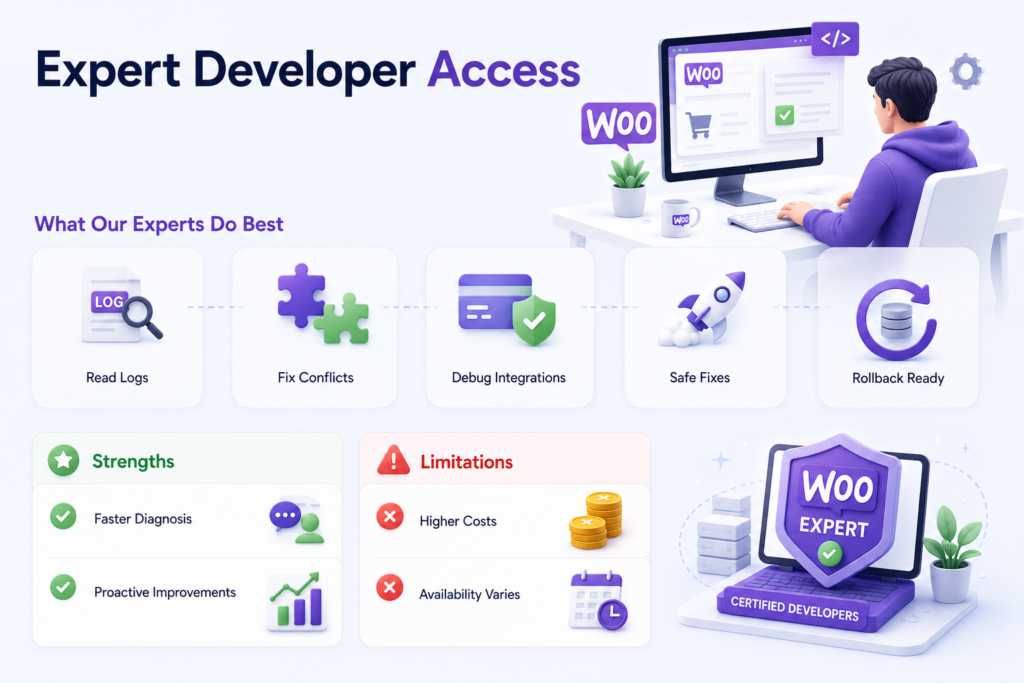
If you’ve ever had a checkout break on a Friday night, you already know why WooCommerce experts and WooCommerce specialists matter. The practical difference between an average and a great WooCommerce development service is that the great one has someone backed by a reliable WooCommerce agency or WooCommerce specialists who actually understand the complexities of WooCommerce website development.
Read WooCommerce logs and trace failures quickly.
- Understand how themes, plugins, and custom code interact.
- Debug payment/shipping integrations without guessing.
- Ship fixes safely (hotfixes with rollback plans)
Strengths and Limitations
Strengths:
- Direct communication with WooCommerce-certified developers speeds up diagnosis and reduces the “telephone game”.
- You can get proactive work done: code reviews, performance tuning, refactoring.
Limitations:
- Skilled WooCommerce specialists cost real money.
- Availability fluctuates. If the team is slammed, your “quick tweak” can sit.
I’ll add one more limitation that nobody likes to say out loud: some “WooCommerce experts” are just people who install plugins quickly. That’s not expertise. Expertise is knowing when not to install the plugin.
Before signing a contract must ask these questions to know whether you’re getting real WooCommerce experts or not:
- “Where will custom code live: theme functions, a custom plugin, or both?”
- “What’s your emergency response SLA if checkout breaks?”
- “Do you do code review and staging deployments by default?”
If they can’t answer confidently, keep shopping.
Usability Insights
Usability isn’t just the customer UI. It’s also the day-to-day admin experience because if managing WooCommerce products and orders is miserable, your team will avoid improving the store.
Onboarding Experience
Most WooCommerce website development companies start with a discovery/onboarding phase. The good ones are structured and slightly annoying (in a good way). They’ll ask for:
- access to hosting, WordPress admin, payment/shipping dashboards
- analytics (GA4), Search Console, ad accounts, if relevant
- top products, margins, shipping constraints
- customer service pain points
Then they translate that into a plan.
A common mistake: store owners show up without priorities. Everything is “urgent.” That makes the team guess, and guessing leads to misaligned builds.
If you want onboarding to work, show up with: Your top 3 revenue goals (AOV, conversion, repeat purchase)
- Your top 3 operational pains (returns, fulfillment, product data)
- A list of “must not break” flows (subscriptions, wholesale, pickup)
Interface Quality
WooCommerce’s interface is generally friendly, but usability depends heavily on what you bolt onto it.
- Add a page builder + heavy theme + 20 marketing plugins, and the admin gets sluggish.
- Add custom product types and poorly designed meta boxes, and your team starts making data entry mistakes.
Good dev services care about admin usability. They’ll:
- Standardize product fields
- Reduce plugin overlap
- Use cleaner UI patterns for custom options.
Learning Curve
The learning curve is medium if you’re new to WordPress. It gets steeper when you add complexity: variable products, bundles, subscriptions, and multi-warehouse inventory.
A team that cares will create quick internal docs like:
- “How to add a product correctly”
- “How coupons are supposed to work here”
- “How to handle refunds to avoid inventory issues”
Mini example: the “coupon chaos” problem
I’ve seen stores where marketing creates coupons that stack unexpectedly with automatic discounts. You end up with negative margins on bestsellers.
A usability-minded dev service will set rules and guardrails:
- Define discount precedence (automatic vs coupon)
- Restrict coupon stacking
- Add admin warnings for risky coupon types.
- Test with real carts (multiple items, shipping, taxes)
Performance Evaluation
Performance is where WooCommerce projects quietly succeed or fail because it’s easy to build an ordinary store without performance checks. That’s where true WooCommerce experts and WooCommerce specialists are needed. If your business starts growing and earning more and more, partnering with a skilled WooCommerce development agency or WooCommerce development company for your WooCommerce website development is a competitive advantage, not an expense.
Speed and Uptime
Many WooCommerce development companies advertise performance metrics like over 99.9% uptime and fast load times. A study reported WooCommerce sites achieving load times under 2 seconds on average, but only when the build is disciplined.
Here’s what I’ve learned the hard way: performance work has to be part of the build, not a clean-up phase.
How I’d evaluate performance (before and after)
If I’m auditing a WooCommerce store with a dev service, I want this sequence:
- Baseline the storefront: category page, product page, cart, checkout.
- Measure server response: TTFB trends, cache hit rates
- Check plugin weight: slow queries, external calls (shipping/tax/payment)
- Database health: options autoload bloat, postmeta size, order tables
- Theme output: render-blocking CSS/JS, image sizes, lazy loading
- Re-test after each change: don’t ship five changes and hope
Common performance mistakes (the ones I keep seeing)
- Too many plugins doing the same job (popups, email capture, analytics)
- Checkout doing real-time calls to everything (tax + shipping + fraud + CRM)
- Unoptimized product images (huge images scaled down with CSS)
- No staging performance testing (everything “felt fine”)
Real-ish example: the “one script killed mobile” incident
In a mid-sized store, we traced a big mobile speed drop to a third-party review widget that loaded multiple scripts and blocked rendering. Revenue dipped, bounce rate spiked, and the team blamed “WooCommerce being slow.”
The fix was straightforward:
- Delay loading the widget until after the main content
- Remove duplicate tracking scripts.
- Replace one heavy carousel with native CSS.
The store didn’t need a new platform. It needed adults to supervise scripts.
Pricing Structure
WooCommerce development services pricing is all over the map because the work ranges from “add a payment method” to “rebuild the entire storefront with ERP integration.” The right WooCommerce development service treats your store as a business asset, not a technical project.
Most agencies offer:
- Hourly rates for smaller tasks
- Project-based contracts for bigger builds
Projects can start around $500 and escalate into the thousands depending on requirements.
What you’re actually paying for
The sticker price isn’t just coding time. You’re paying for:
- architecture decisions (what to custom build vs buy)
- testing and QA (especially checkout)
- deployment discipline
- support when things break
Cheap work is often expensive later because it creates maintenance debt.
Common pricing trap
A business compares two quotes and picks the cheaper one. Then they pay the difference in emergency fixes.
How I know: I’ve been the emergency fix.
Limitations of WooCommerce Website Development Services
WooCommerce is powerful, but there are real limits, especially when WooCommerce services are executed poorly.
Plugin bloat and performance degradation
Performance issues can arise with multiple plugins installed, which is why WooCommerce itself publishes ongoing benchmarking work. This isn’t theoretical. Plugins can:
- Add slow database queries.
- Load scripts sitewide when they’re only needed on one page
- Conflict with other plugins in weird edge cases
A good dev service will prune ruthlessly. A mediocre one will just add “one more plugin.”
Theme and plugin conflicts
Some themes conflict with plugins, especially when they override templates aggressively or bundle outdated copies of scripts.
What that looks like in the real world:
- Cart fragments stop updating
- Variation selectors break
- Checkout fields don’t validate
And here’s the kicker: conflicts often show up only after updates.
Step-by-step: how to reduce these limitations
If you want fewer surprises, insist your dev service does:
- A plugin policy (approved list, review process for new plugins)
- A staging environment with production-like data
- Update windows (weekly/bi-weekly) instead of random updates
- Automated backups + rollback before deployments
- Monitoring for checkout errors and failed payments
Common mistake: Treating maintenance as optional
Owners will spend five figures on a build, then refuse a small monthly maintenance retainer. Six months later, WordPress core updates, plugins lag, and something breaks.
Maintenance isn’t a subscription “upsell.” It’s the cost of running a store on a living ecosystem.
Alternatives to Consider
WooCommerce isn’t the right fit for every business. If a dev service tries to sell it as universal, that’s a red flag.
Shopify (when I’d choose it)
Choose Shopify when:
- You want speed to launch with fewer technical decisions.
- Your catalog and promotions are relatively standard.
- You’d rather accept platform constraints than manage hosting/plugins.
Magento (when it makes sense)
Choose Magento when:
- Your enterprise-scale has complex catalog rules.
- You have internal technical resources.
- You need deep, structured commerce features.
Tradeoff: steeper learning curve and heavier operational overhead.
Step-by-step: how I’d decide between them
When a client asks “WooCommerce vs Shopify vs Magento,” I walk through:
- Complexity.
- Integration depth.
- Team reality.
- Margins.
- Roadmap.
If you expect custom workflows and want control, WooCommerce often wins.
If you want simplicity and don’t want to think about infrastructure, Shopify is hard to beat.
WooCommerce development services in 2026 are worth it if you treat your store like software, plan releases, measure performance, and don’t skip maintenance.
My take:
- Rating Score: 4.5/5
- Recommendation Type: Highly recommended for e-commerce growth and flexibility.
Who should use WooCommerce development services?
- Stores that need scalability + customization
- Businesses ready to invest in proper build practices (staging, QA, monitoring)
- Teams that want ownership of their platform and data
Who should not?
- Businesses with very basic e-commerce needs who want everything out of the box
- Teams unwilling to maintain WordPress/WooCommerce updates
- Anyone who expects “install 30 plugins and it’ll be fine”
A grounded next step (what I’d do this week)
If you’re considering a WooCommerce dev partner, don’t start with design comps. Start with a short audit:
- List your current plugins and monthly costs.
- Identify your top 3 revenue flows (and where they break)
- Ask two providers to propose a 30-day stabilization plan.
The team that talks most clearly about risk, testing, and performance is usually the one that will save you money.
Businesses can build a stronger online store with professional WordPress support that helps maintain performance, security, and reliability as the site grows.
Frequently Asked Questions
Ans: You can customize through:
themes (and child themes)
plugins
custom development (often best done in a custom plugin for maintainability)
Step-by-step, the safest path is:
Use as few plugins as possible to meet requirements
Customize via hooks/filters before editing templates
Put business logic into a custom plugin, not your theme.
Ans: A solid WooCommerce developer (or team) can:
Build features that don’t exist as reliable plugins
Improve UX and conversion by fixing friction points
Reduce outages by implementing staging, backups, and careful updates
Keep performance sane as your catalog and traffic grow
The big benefit is risk reduction.
Ans: Yes, WooCommerce can scale if it’s set up correctly.
The “if” matters. Large stores need:
Performance work as a discipline
careful plugin governance
solid hosting and monitoring
developers who understand WooCommerce internals
If you’re large and you treat WooCommerce like a hobby site, it’ll punish you at the worst possible time


Comments