

Discover WordPress 7.2 Beta 5 Innovations
Explore the latest features and improvements in WordPress 7.2 Beta 5 with a practical guide for serious WordPress teams. Beta 5 is a test build, useful, but not something you “ship and hope.” For agencies, publishers, stores, and enterprises, the real win is catching theme, plugin, and workflow breakage before editors, customers, or revenue teams trip over it.
So treat it like an inspection pass: review the deltas, run your real workflows, log what fails, and hold off until you’ve got evidence. A beta stays in a controlled environment, period.
Why WordPress 7.2 Beta 5 Matters
A beta lets teams see where the next release is headed. But it also surfaces the unflashy stuff that breaks real sites: plugin compatibility, custom block behavior, editorial permissions, checkout flows, cache rules, and even the deployment scripts nobody remembers until they fail.
The first WordPress 7.2 beta was released on October 20, 2026, with a planned final release on December 8, 2026, according to this documented beta feature overview. That timeline gives you a practical window to test, although it still doesn’t make a beta a safe production upgrade.
For a digital agency, risk usually shows up across a portfolio, not a single site. A plugin that behaves on a simple brochure build can still fall apart on a multilingual publisher or a store with custom checkout logic, so test the client stack that actually matters.
For an eCommerce brand, guard the path from product discovery to order confirmation. For a publisher, focus on drafts, scheduled posts, reusable blocks, media handling, and ad integrations. Enterprise teams should also run through SSO, roles, observability, and rollback procedures.
My view is straightforward: beta testing is release-risk management, not a race to show off a new version number.
Exploring WordPress 7.2 Beta 5 Features
What may change
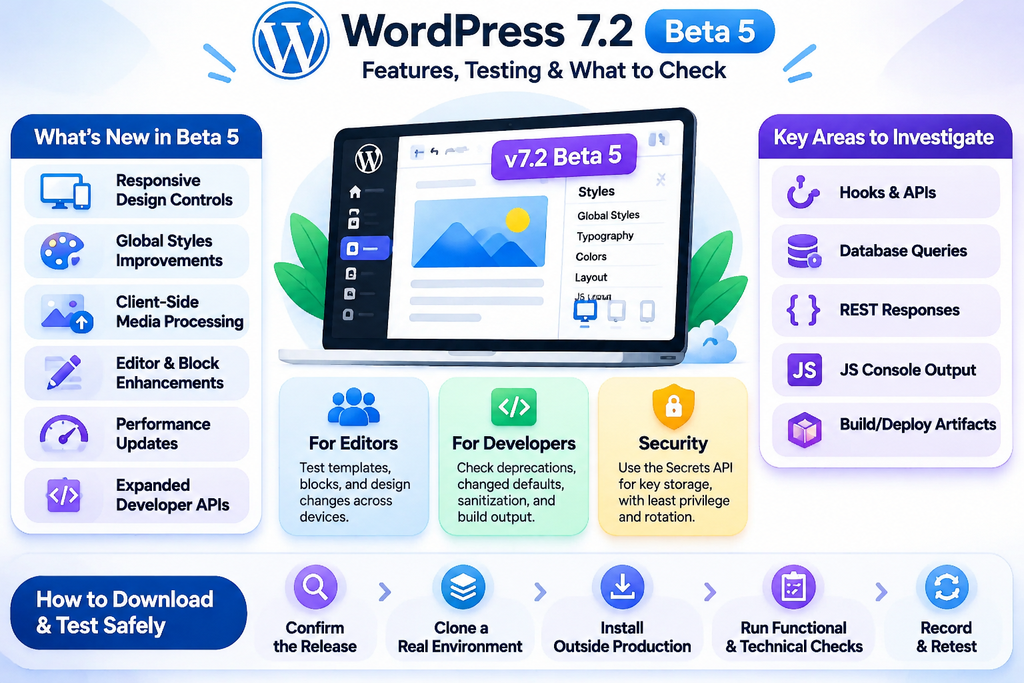
The verified WordPress 7.2 direction includes responsive design controls, Global Styles improvements, client-side media processing, editor work, and performance changes. A technical upgrade overview also describes expanded developer APIs.
That scope matters because it hits both what editors see and what your integrations rely on. A custom block can still render fine, but its inspector controls might misbehave at smaller viewports. Meanwhile, media handling may feel quicker, yet still change assumptions your server-side pipeline depends on.
How to investigate
For deeper validation, diff hooks, APIs, database queries, REST responses, JS console output, and build/deploy artifacts between your current version and the beta. Don’t call it “compatible” because the homepage loads.
For example, if you maintain a block theme, test theme.json, custom blocks, editor roles, and front-end output together, you’ll miss the interactions that break in real use.
What Changes Inside WordPress 7.2 Beta 5
A practical way to evaluate WordPress 7.2 Beta 5 is to think in terms of system boundaries, what shifts for editors, what shifts for developers, and what changes your risk surface.
Editor and design system
The current direction adds more responsive controls and polishes Global Styles. Reported updates include viewport-specific settings, a customized filter, inherited style values in the inspector, form styling, text shadows, and navigation editing. That can mean less custom CSS over time, but it also means more states to validate before you ship.
For publishers, spot-check article templates at mobile, tablet, and desktop widths, because the same block can now behave differently by viewport. For agencies, compare saved markup before and after edits to catch unexpected diffs. And if your editorial team works inside strict design tokens, test whether the UI makes it too easy to create “just this once” exceptions.
Credentials and security posture
A Secrets API aims to give plugins a standard place to store API keys; it’s helpful, but it still doesn’t replace least privilege, secret rotation, environment separation, or server-side controls.
Developer surface
More APIs and hooks can unblock custom integrations, yet they can also add upgrade chores. I’d scan deprecations, changed defaults, sanitization behavior, and JavaScript build output before approving a fleet rollout.
How to Download and Test the Beta
Start with provenance, not curiosity. For this article, available search results don’t confirm a public WordPress 7.2 Beta 5 package or an official Beta 5 GitHub release, so treat any random zip as untrusted, even if it looks “official.”
Use this process:
- Confirm the release record. Verify announcements and release notes through official WordPress project channels before you pull anything. Searching WordPress 7.2 beta 5 GitHub can surface forks, mirrors, and unrelated repos that happen to match the keywords.
- Clone a representative environment. Bring over the real theme, required plugins, custom blocks, content types, roles, integrations, and scheduled jobs, basically the stuff that breaks in the real world.
- Install outside production. Work in a throwaway local or staging stack. Also, keep backups separate from the test system so you don’t “restore” bad state by accident.
- Run functional checks. Walk through publishing, media uploads, forms, search, redirects, checkout, refunds, feeds, and editorial permissions.
- Run technical checks. Watch PHP logs, browser console errors, REST responses, cron behavior, cache purges, and database queries.
- Record and retest. A good issue report includes steps, expected behavior, actual behavior, environment details, and a small reproduction case.
The official testing overview spans JavaScript, end-to-end, PHP, and performance testing. That range matters, because one “works on my homepage” pass can miss a permissions edge case in WordPress 7.2 Beta 5.
If an official beta download later appears, confirm the version and checksum via published project channels, then pin the exact build in your pipeline. Floating versions quietly change between runs, and that ruins debugging.
Think of Beta 5 as a Test Drive
Treat WordPress 7.2 Beta 5 like a prototype car running laps on a closed track. You’re not admiring the paint; you’re checking steering feel, braking behavior, cabin controls, and how the engine reacts under load.
You wouldn’t toss that prototype straight into a delivery fleet, because the real world is messy. Same deal for a high-traffic store or publishing stack. So, keep the beta on staging, run the workflows you rely on, and flag anything that behaves differently than production.
For an agency, that “track” means multiple client setups with different themes, plugins, and hosting quirks, but for a publisher, it’s the full editorial chain. For an eCommerce team, it’s inventory, payments, shipping, tax, and those confirmation steps people forget until they break.
Feedback matters because maintainers can still reproduce and fix issues while the release is in motion. The payoff isn’t novelty; it’s earlier visibility.
Common WordPress Beta Testing Mistakes
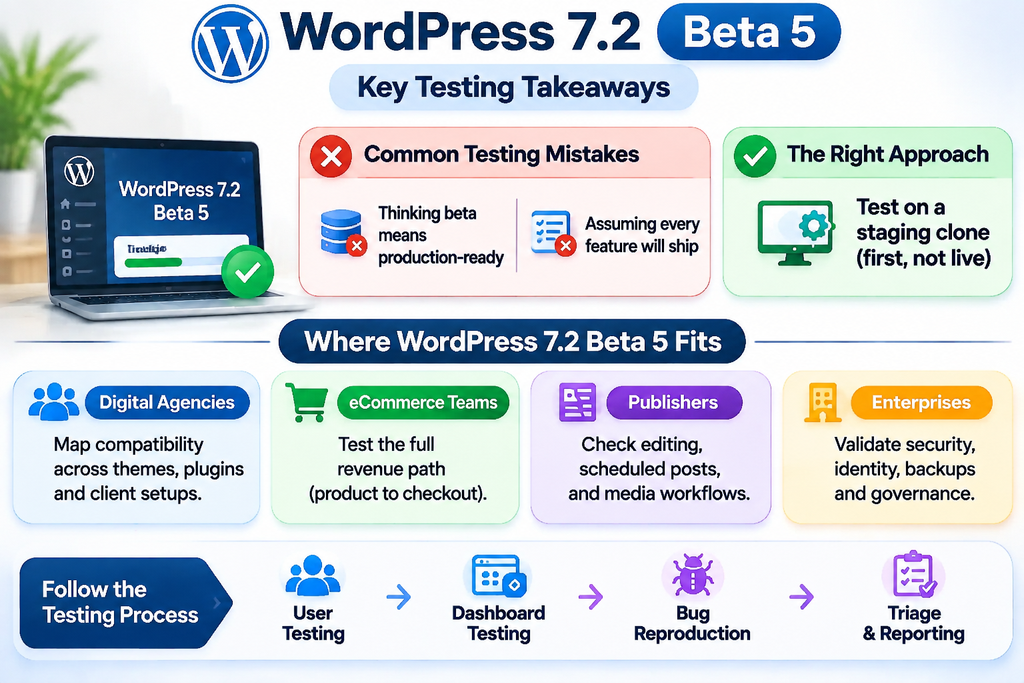
“Beta means production-ready”
It doesn’t. WordPress beta builds can still ship with defects, regressions, half-finished features, or ugly compatibility surprises. So running tests on a live store is a bad bet; one failed checkout flow can mess with orders, customer data, and trust fast.
Work from a staging clone instead. Where it matters, mask sensitive data, turn off outbound email, and keep payment systems isolated. Publishers should also block test content from leaking into feeds, search indexes, or social automation, because cleanup is never as quick as you hope.
“Every listed feature will ship”
Roadmaps shift. After feedback, features can change shape, get narrowed, or get dropped ahead of a WordPress Release. Even when something makes it through, behavior often differs from an early beta.
That’s why I separate “interesting” from “approved.” Document the feature you need, tie it to the business outcome, then wait for final release notes before assigning a production task. The latest WordPress release should be judged on verified behavior, not screenshots.
Where WordPress 7.2 Beta 5 Fits
Digital agencies can treat the beta as a quick way to map compatibility across your usual mix of themes, plugins, hosting layers, and the recurring “client special cases” that always show up late. Start with one straightforward site, then move to one intentionally messy build. That second environment is where you’ll catch the real friction: custom blocks, multilingual setups, search tuning, forms, and deployment hooks.
eCommerce teams should stay close to the money. Run the full revenue path: product pages, cart fragments, checkout, payment callbacks, order emails, stock changes, and analytics events. For performance, don’t stop at a synthetic homepage score; check cache behavior and script loading, because that’s where regressions tend to hide.
Publishers have different failure modes. Stress bulk editing, scheduled posts, revisions, media transforms, author permissions, taxonomy archives, feeds, and ad slots. Even a small editor tweak can ripple through a newsroom workflow.
Enterprises should add governance on top. Validate identity systems, audit logs, secrets handling, backups, observability, and change approval. A beta helps architecture teams, but only if the test environment mirrors operational reality.
The WordPress testing team outlines user testing, dashboard testing, bug reproduction, and triage in its testing guidance, and internal teams can mirror that cadence.
WordPress 7.1, Plugins, and Upgrade Risk
WordPress 7.2 follows the path set by WordPress 7.1, so your comparison should stay focused: responsive styling, Global Styles, client-side media processing, editor changes, performance, and the wider set of developer APIs outlined in this technical upgrade overview.
First, run a “before” inventory you can actually repeat. Record active plugins, theme version, custom code, PHP settings, database size, scheduled events, REST consumers, and a few front-end performance traces. Then, do the same checklist again on your beta environment, so you’re comparing like for like.
Pay extra attention to plugins, because compatibility depends on how you use them. For example, a form plugin might submit fine for admins, yet fail for a custom role that triggers different validation and notifications.
I’d test by workflow, not by plugin count. Prioritise what drives revenue, publishes content, controls access, or pushes data into another system, because that’s where upgrade risk shows up fastest.
What WordPress 7.2 Beta 5 Means
WordPress 7.2 Beta 5 is your early warning system before the final release, but I can’t treat it as a fully verifiable test target here. The information available for this article doesn’t confirm a publicly downloadable Beta 5 package, and it also doesn’t validate every feature that may or may not have landed in that specific build.
Still, the direction is readable: responsive design, Global Styles, editor upgrades, client-side media processing, performance work, developer APIs, and tighter credential handling. A WordPress 7.2 release tracker listed Beta 5 as due on November 10, 2026, although that’s scheduling context, not proof you can fetch it today.
So the move is controlled testing: clone the site, pin the build, run critical paths, read logs, document regressions, then re-test after fixes.
I’d rather hold a rollout than learn about a checkout or publishing break in production. Betas should shrink risk, not create false certainty.
Questions About WordPress 7.2 Beta 5
It’s an early, pre-release build meant for validation, not day-to-day publishing. Run it in a local install or a staging stack, because the whole point is to surface issues before anything reaches production.
No. Betas can ship with bugs, regressions, and rough edges, so keep them confined to test or staging environments. Also, protect production data while you test: copy sanitized data, turn off anything that triggers payments or emails, and limit external side effects so you don’t accidentally spam users during a WordPress beta run.
Expect work around a redesigned interface, performance improvements, and tightened security protocols. The verified WordPress 7.2 direction also includes responsive controls, Global Styles work, text shadows, navigation editing, client-side media processing, and a Secrets API.
Expect work around a redesigned interface, performance improvements, and tightened security protocols. The verified WordPress 7.2 direction also includes responsive controls, Global Styles work, text shadows, navigation editing, client-side media processing, and a Secrets API.
A beta is for testing and can break; stable releases are more thoroughly vetted and are what you run on live sites. Even then, a stable WordPress Release still needs your own plugin, theme, and hosting compatibility checks before you roll it out broadly.





Comments