

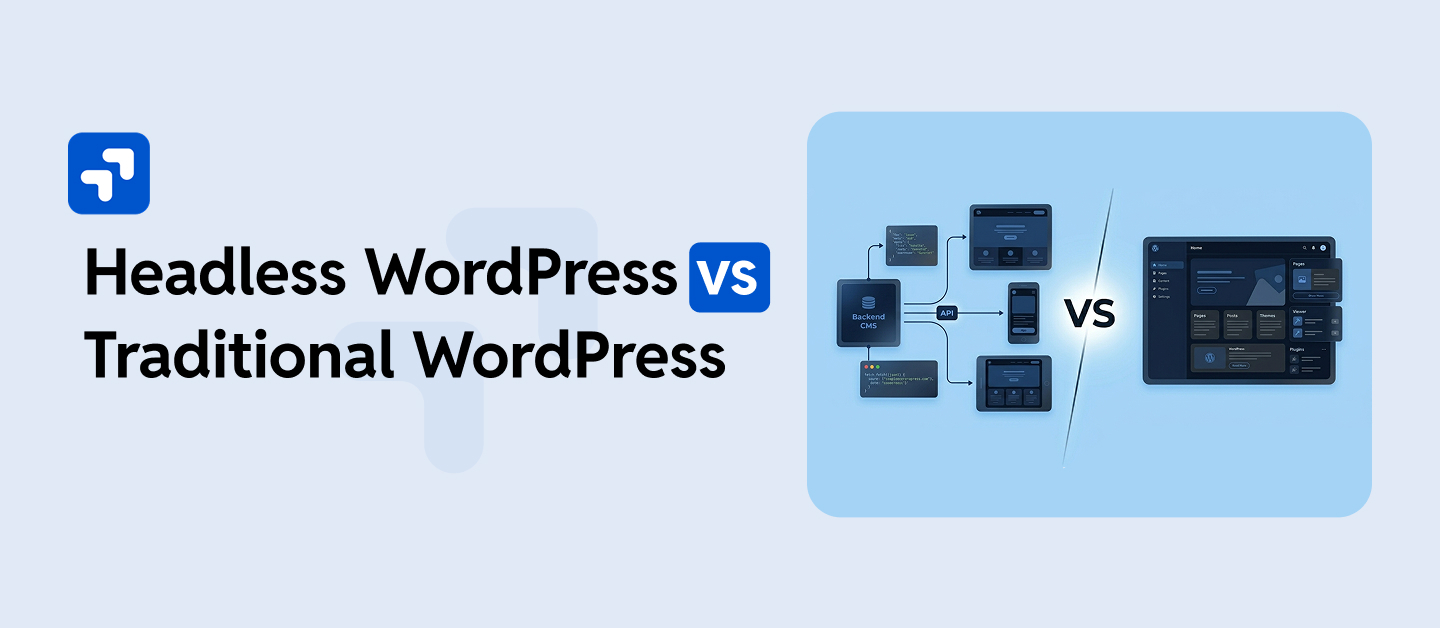
If you’re scaling a WordPress-powered business in 2026, you’ve almost certainly encountered the debate: headless WordPress vs traditional WordPress. One promises blazing fast frontends and unlimited creative freedom. The other offers simplicity, a mature ecosystem, and a lower total cost of ownership. But which one actually fits your business?
In this guide, we break down both architectures Headless WordPress vs. Traditional WordPress in plain terms, covering performance, SEO, developer cost, content editing experience, scalability, and real-world use cases so you can make an informed decision before investing in either direction.
Whether you’re a fast-growing eCommerce brand, a digital publisher, or an agency evaluating your next client build, this comparison will give you the clarity you need.
Table of Contents
- What Is Traditional WordPress?
- What Is Headless WordPress?
- How They Differ: Architecture at a Glance
- Performance Comparison: Speed & Core Web Vitals
- SEO Comparison: Which Ranks Better?
- Developer Experience & Build Cost
- Content Editor Experience
- Scalability & Security
- When to Choose Headless WordPress
- When to Choose Traditional WordPress
- Full Feature Comparison Table
- Frequently Asked Questions
1. What Is Traditional (Coupled) WordPress?
Traditional WordPress, often called coupled WordPress or monolithic WordPress, is the architecture most people are familiar with. In this setup, WordPress handles everything in one unified system that is content management, theme rendering, plugin logic, and HTML delivery to the browser all happen within the same application.
When a visitor hits your URL, WordPress runs a PHP query against your database, renders the page using your active theme’s template files, and delivers fully-formed HTML to the browser. The backend and frontend live together, communicate internally, and deploy as a single unit; consequently, they remain tightly coupled.
This is how the vast majority of the 800+ million WordPress-powered websites on the internet operate today. It is battle-tested, has a massive plugin and theme ecosystem, and requires far less specialized development knowledge than a decoupled setup.
Core components of traditional WordPress:
- PHP-powered backend processes requests, queries the database, and renders templates
- MySQL/MariaDB database stores all content, settings, and user data
- Theme layer controls the visual output via template files including functions.php, template parts, and page templates
- Plugin ecosystem extends functionality through 59,000+ plugins available on WordPress.org
- wp-admin dashboard the content editing and site management interface
2. What Is Headless WordPress?
Headless WordPress decouples the content management backend from the frontend presentation layer. In a headless setup, WordPress acts purely as a content management system: on one hand, it stores content, manages users, and handles editorial workflows; on the other hand, it no longer renders HTML pages for end users.
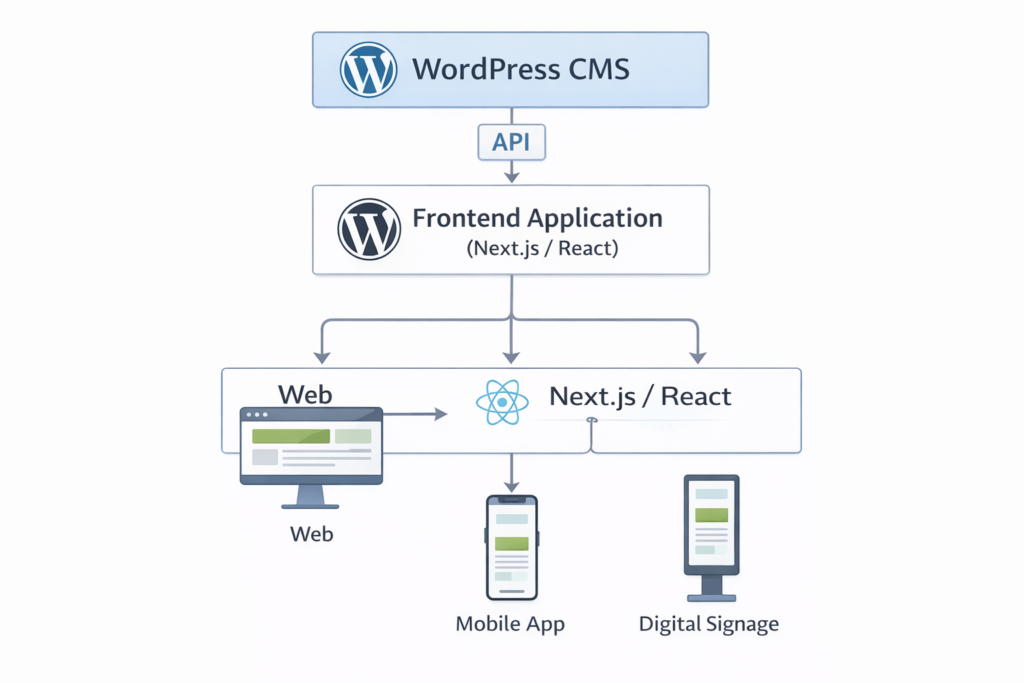
Instead, a separate frontend application commonly built with Next.js, Nuxt.js, Gatsby, Astro, or SvelteKit requests content from WordPress via its REST API or WPGraphQL, then independently renders it. The “head” of the browser-visible output has been removed from WordPress and placed in a modern JavaScript framework.
This is why we refer to it as “headless”: after all, the body (CMS) exists, though the head (rendering engine) has been replaced with something purpose-built for performance, flexibility, or omnichannel delivery.
Core components of headless WordPress:
- WordPress, as a CMS backend, manages content, taxonomy, users, and editorial workflows
- REST API or WPGraphQL serves content as structured JSON data to the frontend
- Decoupled frontend framework Next.js, Nuxt, Gatsby, or Astro renders the user-facing site
- CDN and edge network deliver statically generated or edge-rendered pages globally at low latency
- Optional Faust.js WP Engine’s framework, purpose-built for headless WordPress development
3. How They Differ: Architecture at a Glance
The most fundamental difference between headless and traditional WordPress is where rendering happens. In traditional WordPress, the server renders HTML using PHP templates. In headless WordPress, a JavaScript framework renders pages either on the server (SSR), at build time (SSG), or in the browser (CSR).
The most fundamental difference between headless and traditional WordPress is where rendering happens. Specifically, in traditional WordPress, the server renders HTML using PHP templates. This single architectural decision, however, cascades into every other consideration: performance, SEO implications, team requirements, maintenance overhead, plugin compatibility, and total cost of ownership.
| Factor | Traditional WordPress | Headless WordPress |
|---|---|---|
| Rendering engine | PHP / WordPress theme | JavaScript framework (Next.js, Nuxt, etc.) |
| Frontend control | Limited by theme or page builder | Complete any design is possible |
| Content API | Not used by default | Core REST API or WPGraphQL |
| Plugin compatibility | Full | Partial backend plugins only |
| Deployment complexity | Low | High |
| Omnichannel delivery | Web only | Web, mobile, IoT, kiosks |
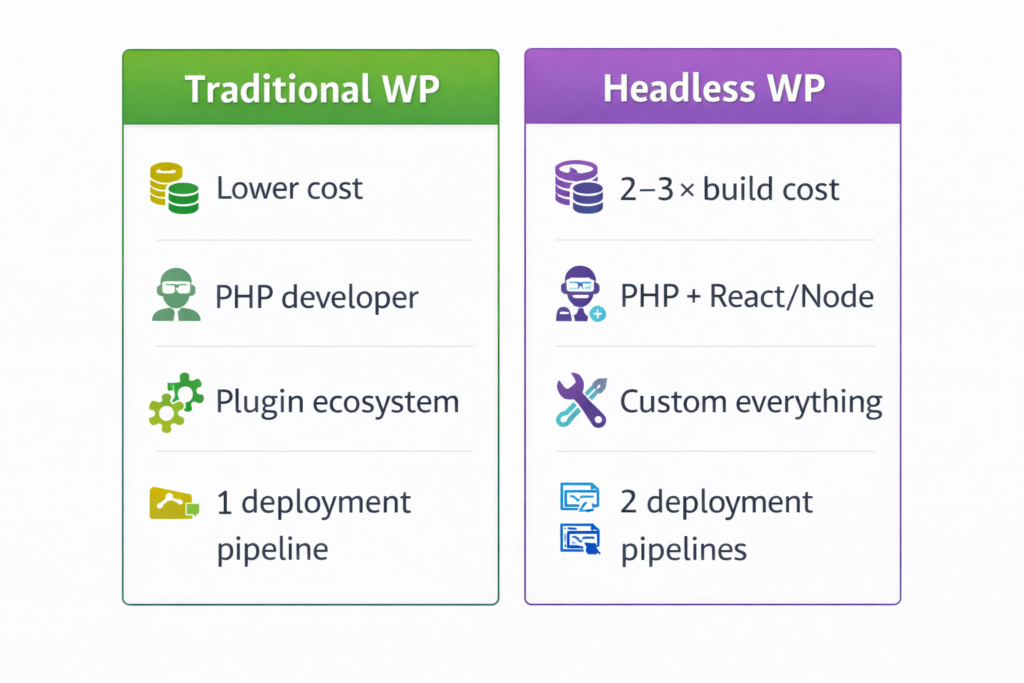
| Developer requirements | PHP and WordPress expertise | PHP plus React/Node.js expertise |
4. Performance Comparison: Speed & Core Web Vitals
Performance is where headless WordPress makes its strongest case. Since the frontend is a static or server-rendered JavaScript application deployed to a CDN or edge network, Time to First Byte (TTFB) can be reduced to under 50ms globally compared to 200–800ms for a server-rendered traditional WordPress site without aggressive caching.
For Google’s Core Web Vitals specifically, Largest Contentful Paint (LCP) and Interaction to Next Paint (INP), a well-built headless WordPress site can consistently hit “Good” thresholds that are difficult to achieve in traditional WordPress without a significant optimization investment.
Traditional WordPress performance ceiling:
- PHP processing time adds 100–400ms of server latency per uncached request
- Page builder tools like Elementor, Divi, and WPBakery can generate bloated HTML, CSS, and JavaScript output
- Plugin stacking leads to render-blocking scripts and large DOM sizes
- With proper caching using WP Rocket, Redis, or Nginx FastCGI, traditional WordPress can achieve excellent Core Web Vitals scores; it just requires deliberate engineering
Headless WordPress performance advantages:
- Static Site Generation (SSG) pre-builds pages at deploy time, no runtime PHP processing required
- Edge CDN delivery means pages are served from nodes closest to the user globally
- Fine-grained JavaScript bundle splitting and lazy loading at the framework level
- Server-Side Rendering (SSR) with Incremental Static Regeneration (ISR) balances freshness with speed
Key insight: A traditional WordPress site, expertly optimized by engineers who understand caching, server configuration, and Core Web Vitals like WPGrit’s WP Speed Optimization & Technical SEO service, can match or closely approach headless performance for most use cases. Headless is not automatically fast. The engineering discipline behind both approaches is what determines the outcome.
5. SEO Comparison: Which Architecture Ranks Better?
This is one of the most common concerns when considering headless WordPress, and it comes with important nuances. The short answer: both architectures can rank well in 2026, but the risks and implementation complexity differ significantly.
Traditional WordPress SEO advantages:
- Yoast SEO, RankMath, and other SEO plugins work natively and are deeply integrated
- Server-rendered HTML is immediately indexable by Googlebot without JavaScript rendering
- Sitemaps, schema markup, breadcrumbs, and canonical tags are easily managed via plugins
- WordPress has over 20 years of SEO maturity baked into its ecosystem
- Internal linking, redirect management, and technical SEO audits are straightforward
Headless WordPress SEO considerations:
- If using Server-Side Rendering (SSR) or Static Site Generation (SSG), pages are fully rendered, and HTML search engine indexability is excellent
- If using Client-Side Rendering (CSR) without pre-rendering, Googlebot may struggle to index JavaScript-rendered content a critical SEO risk if not addressed
- Meta tags, Open Graph data, and structured data must be manually implemented at the framework level; no plugin handles it automatically
- XML sitemaps, canonical URLs, and hreflang for multilingual sites require custom engineering work
- Faster page speeds from headless delivery indirectly improve SEO through better Core Web Vitals scores
Despite these complexities, however, for most content-driven businesses, traditional WordPress with a properly structured technical SEO and performance optimization strategy is the lower-risk, higher-ROI path to search visibility.
6. Developer Experience & Build Cost
One of the most underestimated differences between headless and traditional WordPress is the total cost of ownership, not just the initial build, but the ongoing development, maintenance, and hiring implications.
Traditional WordPress development:
- A mature, well-documented ecosystem where most problems already have solutions
- A large global talent pool of WordPress developers is available at various price points
- The plugin ecosystem dramatically reduces custom development time and cost
- Theme frameworks like GeneratePress, Kadence, and Blocksy accelerate frontend build time
- Updates, patches, and maintenance follow a predictable and well-understood cadence
- Lower initial investment is well-suited for startups, SMBs, and content-focused sites
Headless WordPress development:
- Requires expertise in both WordPress (PHP, REST API, WPGraphQL) and a frontend JavaScript framework
- Significantly smaller talent pool, senior headless WordPress engineers command premium rates
- You lose the benefit of most WordPress frontend plugins, forms, sliders, page builders, and eCommerce front ends must be rebuilt or re-integrated
- Two separate deployment pipelines to manage the WordPress CMS and the frontend application
- Higher initial build cost is typically 2 to 3 times more than a traditional WordPress project of comparable scope
- Preview functionality for content editors is more complex to implement
WPGrit’s take: Headless WordPress is a strategic investment, not a default choice. However, for businesses where frontend performance and omnichannel content delivery directly impact revenue, specifically, high-traffic publishers, enterprise SaaS platforms, and headless eCommerce, the investment is justified. For the majority of businesses, in fact, a well-architected traditional WordPress build delivers equivalent results at a fraction of the cost and complexity. Our WordPress Architecture Engineering process always starts with understanding your actual business requirements before recommending a direction.
7. Content Editor Experience
A critical but often overlooked factor in the headless vs traditional debate is what the experience is like for your non-technical content team.
Traditional WordPress editing:
- The Gutenberg block editor and classic editor offer a what-you-see-is-what-you-get (WYSIWYG) workflow
- Editors see exactly how a page will look while building it no knowledge of the frontend stack required
- Page builders like Elementor or Bricks Builder provide drag-and-drop visual editing
- Live preview is instant, intuitive, and requires zero configuration
Headless WordPress editing:
- Content editors still use the familiar WP-Admin interface, and the Gutenberg backend experience is unchanged
- The key limitation: live preview is broken by default. Because the frontend is a separate application, the standard WordPress preview functionality does not reflect the actual rendered output
- Solutions like Faust.js, ACF front-end previews, or custom preview routes can restore this functionality, but they require dedicated engineering effort to set up
- Non-technical editors may feel uncertain about how their content will actually appear, creating friction in the publishing workflow
For businesses where a large non-technical editorial team drives publishing velocity, the headless preview problem is a real operational bottleneck and one worth weighing carefully against the performance benefits.
8. Scalability & Security
Scalability:
Headless WordPress vs Traditional WordPress architectures can scale to handle massive traffic, but they scale differently. Traditional WordPress scales through horizontal server scaling, managed hosting, caching layers using Redis, Varnish, or Nginx FastCGI, and a CDN in front of WordPress. This is a proven and well-understood scaling path used by sites serving tens of millions of monthly visitors.
Headless WordPress scales at the frontend level more elegantly, a statically generated or edge-rendered frontend inherently handles traffic spikes without WordPress’s PHP layer becoming a bottleneck. The WordPress CMS backend, however, still needs proper scaling if many simultaneous API requests are hitting it.
For Enterprise WordPress and WordPress Multisite environments, the scaling strategy needs to be designed at the architecture level, whether headless or traditional. This is exactly the kind of systems thinking WPGrit brings to every engagement.
Security:
Headless WordPress offers a structural security advantage: the WordPress admin interface is never directly exposed to the public internet. The only publicly accessible surface is a read-only API endpoint. This eliminates a whole class of attacks targeting wp-login.php, xmlrpc.php, and the WordPress admin dashboard.
That said, traditional WordPress can be hardened to a very high security standard through proper configuration, firewall rules, and a disciplined WordPress security and risk management approach. The attack surface can be drastically reduced without requiring a full architectural change.
9. When to Choose Headless WordPress
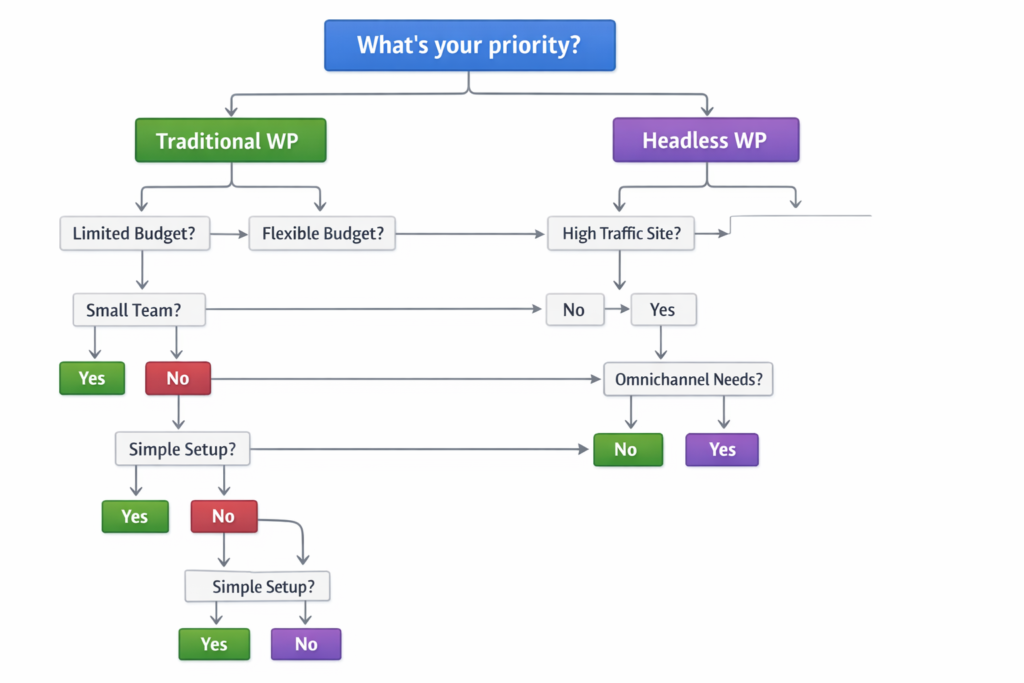
In a fight between Headless WordPress vs Traditional WordPress, Headless WordPress is the right architectural choice when the following conditions apply to your business:
1. You need omnichannel content delivery. Your content needs to power not just a website, but a mobile app, digital kiosk, voice interface, or other digital touchpoints. A single headless CMS can serve all channels simultaneously via its API.
2. You are building a high-traffic publisher or media brand. Sites publishing hundreds of articles per day and serving millions of sessions per month benefit significantly from edge-delivered static pages. The performance advantage translates directly to ad revenue and engagement metrics.
3. Your frontend requires custom interactions that traditional themes cannot deliver. Complex filtering interfaces, interactive data visualizations, real-time features, or highly animated marketing pages are far easier to build in React and Next.js than in a WordPress theme.
4. You are building a SaaS product with a content-driven marketing site. If your tech stack is already JavaScript and React-based, a headless WordPress backend slots naturally into your existing infrastructure and team capabilities.
5. You have a dedicated JavaScript engineering team. Headless WordPress is only a sound investment if you have or can hire engineers fluent in both WordPress and modern frontend frameworks.
6. Long-term frontend flexibility is a strategic priority. Headless lets you swap out frontend frameworks independently of the CMS, future-proofing your architecture as frontend technology evolves.
If these conditions match your situation, explore WPGrit’s Headless WordPress solution. We architect and build headless WordPress systems designed for performance, scalability, and editorial usability from day one.
10. When to Choose Traditional WordPress
In Headless WordPress vs Traditional WordPress, the Traditional WordPress remains the superior choice for the majority of business websites in 2026. Choose it when:
1. You need to move fast and cost-efficiently. In contrast, a skilled team can architect, build, and launch traditional WordPress in weeks with a fraction of the development budget of a headless project.
2. Your team is non-technical or has limited development resources. The WordPress admin, page builder tools, and plugin ecosystem empower non-developers to manage and grow their site without engineering bottlenecks.
3. eCommerce is a core function. WooCommerce in a traditional WordPress environment offers the most complete, plugin-supported, battle-tested eCommerce experience. While headless WooCommerce is possible, it is significantly more complex. See how WPGrit approaches WooCommerce solutions.
4. You rely heavily on WordPress plugins for core functionality. Contact forms, membership systems, LMS plugins, booking systems, and review plugins all assume a traditional WordPress frontend. In headless, you either lose these or rebuild them from scratch.
5. SEO, content marketing, and blogging are central to your growth strategy. Traditional WordPress with a properly tuned performance and technical SEO stack is among the best environments for content-driven growth.
6. You are on a long-term support or retainer model. Traditional WordPress is far easier to maintain, update, and support for an ongoing agency relationship. Learn more about WPGrit‘s WordPress Retainer partnerships.
11. Full Feature Comparison Table
| Feature | Traditional WordPress | Headless WordPress |
|---|---|---|
| Setup complexity | Low | High |
| Initial build cost | Lower | 2–3× higher |
| Ongoing maintenance | Lower | Higher |
| Frontend performance | High with optimization | Very high |
| Core Web Vitals potential | Good to Excellent | Excellent |
| SEO capability | Excellent via native plugins | Excellent with SSR or SSG |
| Plugin ecosystem | Full 59,000+ plugins | Backend only |
| Content editor experience | Excellent WYSIWYG | Good preview needs setup |
| WooCommerce support | Fully supported | Possible but complex |
| Omnichannel delivery | Web only | Web, mobile, IoT, any channel |
| Security attack surface | Manageable with hardening | Smaller by default |
| Frontend tech flexibility | Tied to PHP and theme | Freely replaceable |
| Developer availability | Large global talent pool | Specialist skill required |
| Time to launch | Faster | Slower |
| Best for | SMBs, eCommerce, agencies, content sites | Enterprise, SaaS, publishers, omnichannel brands |
Conclusion: It Is an Architecture Decision, Not a Trend Decision
The headless WordPress vs traditional WordPress debate completely depends on your business needs; the right is answer is what your business demands for. Headless is powerful, but it is a strategic investment that pays off only when your use case genuinely demands it: high-traffic publishing, omnichannel delivery, or a frontend engineering team already fluent in JavaScript frameworks.
For the vast majority of businesses, from growing eCommerce brands and service agencies to content-driven SaaS companies, traditional WordPress, expertly built and properly optimized, delivers enterprise-grade performance, security, and scalability without the complexity premium. The most important variable in either scenario is not the architecture itself; it is the quality of the engineering behind it. A poorly built headless site will underperform a well-built traditional one every time.
At WPGrit, every architecture recommendation begins with a thorough understanding of your business requirements, traffic patterns, team capabilities, and growth trajectory. Whether you need a headless WordPress build, a traditional WordPress architecture engineered for scale, or a migration from one to the other, we build WordPress systems that grow with your business.
Ready to make the right architecture choice? Talk to a WPGrit architect today →


Comments